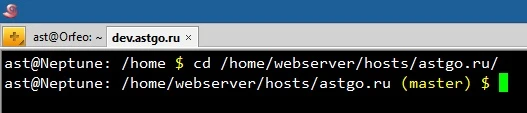
If you are working on multiple branches at the same time, it is always useful to know which branch the HEAD pointer of the repository is currently on. To avoid relying on memory, you can add the branch name display to the command prompt. To do this, open ~/.bashrc for editing:
export PS1='\u@\h: \w\[\033[01;33m\]$(__git_ps1) \$\[\033[00m\] 'Admire your result now! But, ideally, it’s better to just install zsh — it’s worth it.