I was a big Iron Man fan. I remember walking out of the cinema buzzing, imagining that someday I’d have a Jarvis of my own. I’d be able to talk to him in the middle of something, and he’d already know what I was working on, remember our earlier conversations, and understand what I meant.
These days, I want to be able to tell an assistant that I’ve finished a book and have it update my reading list. Or ask what I left unfinished in a project without first explaining the project again. Or find a decision I remember making, somewhere, for reasons I would quite like to recover.
All of this requires somewhere for the information to live after the conversation ends.
People call this a second brain. A slightly ambitious name for a collection of notes, but I like the underlying idea: write things down in a place you can come back to, connect them where it helps, and stop relying on remembering which app you put them in.
Mine lives in Obsidian. The vault contains project notes, tasks, a diary, books and films, saved sources, documents, and my own explanations of things I’ve figured out. There is room for mundane material too: an idea for a blog post, details about something I own, notes about food or a trip. I don’t need a separate theory of knowledge for remembering lunch.
The interesting addition is an agent that can work with the same material. It can find a note, follow its links, check the relevant instructions, and change the original file. The result is still there when I close the chat.
But before any of that becomes useful, the files have to get to the machine where the agent runs. That turned out to deserve a post of its own.
A Folder With Some Rules
An Obsidian vault is a directory. Notes are Markdown files; attachments live alongside them. I can open the directory in another editor, search it from a terminal, or give an agent access to it. Obsidian supplies the interface I enjoy using, while the files remain accessible outside it.
My folder structure borrows from PARA: projects with a finish line, ongoing areas of responsibility, reference material, and an archive. The actual folders are a little more specific:
| Folder | What I keep there |
|---|---|
Projects/ |
Work with a defined outcome: what I want to finish and what would count as finished. |
Domains/ |
Ongoing areas such as work and household matters, with their supporting notes. |
References/ |
Cards for books, films, people, links, and documents. |
Knowledge/ |
My own explanations and notes that bring several sources together. |
Daily/ |
Dated personal records. |
Inbox/ |
Material I haven’t sorted yet. |
Archive/ |
Inactive material worth keeping, including finished projects. |
The folders give me a starting point. Links do the rest. A diary entry can refer to a project; a project can refer to a document without acquiring its own copy of it.
For collections, I use note properties and Obsidian Bases. A book has its own note with its reading status. A Base shows those notes as a table or another view. The status belongs to the book note; I don’t maintain a second handwritten list of the same statuses. Tasks work similarly: the action lives in its relevant note, and a task view collects it.
This matters more once an agent is involved. “Mark this book as read” should have one obvious destination. If the same fact is maintained in four places, the assistant gets four opportunities to leave me a plausible inconsistency.
The vault also has an AGENTS.md with navigation and general rules, plus procedures for particular jobs. Those describe where tasks belong, what fields a project needs, how to update a collection, and when to ask before changing something. Search helps the agent locate material without reading the entire vault on every request. The agent still needs to open the original note and check what it actually says.
There are limits to the “everything in one place” idea. A food log can live in Markdown, but if I maintain it in a separate service, the agent needs that service’s integration. A note about an appointment doesn’t put it on a calendar. I want the vault to connect these things and make it clear where each fact belongs and where to update it.
The useful requests are quite ordinary: “What is the next step here?”, “Find my notes about this”, “Save this idea next to the project it belongs to.” A coding agent with filesystem access can do a surprising amount of household administration. The files don’t mind that they aren’t source code.
One Knowledge Base, Three Devices
I need one knowledge base that stays in sync across my phone, work computer, and server. The phone is handy for quickly saving a thought or checking a task list. At the computer, I can sort through notes and work on a project. On the server, the agent works with the same files, even when the work computer is switched off.
The phone needs a local copy, though. Without an internet connection, I still want to open a PDF I’ve already downloaded, read a note, or write a new one. Edits should stay on the device and reach the others once the connection returns.
That’s the graceful degradation I want: without a connection, sync and the remote assistant are temporarily unavailable, but I can still use the knowledge base itself. Jarvis can wait; I need to write the thought down now.
iCloud Was Where This Fell Apart
I used iCloud for Obsidian synchronisation. It worked badly enough on my iOS devices that I stopped trusting it.
Linux made the choice easier. I also needed a dependable local copy on a Linux machine, where the agent could read and edit files. iCloud never became a reliable part of that setup. A knowledge base loses much of its appeal when using it starts with checking whether it has arrived.
The official Obsidian Sync service wasn’t an option for me either. Standard includes 1 GB and Plus includes 10 GB: a laughable amount for a knowledge base where I want to keep my PDFs. Plus can be expanded to 100 GB, but I preferred my own storage without tying the size of my collection to a subscription tier.
I ended up choosing Self-hosted LiveSync, a community plugin, with my own CouchDB backend. It is a separate synchronisation system, despite the similar names.
What Runs Where
For synchronisation, I have a separate server running CouchDB. The vault itself and the agent live on a Linux machine on top of a cupboard at home. I enjoy looking at it, and I enjoy having that part of the system on my own hardware, independent of cloud hosting.
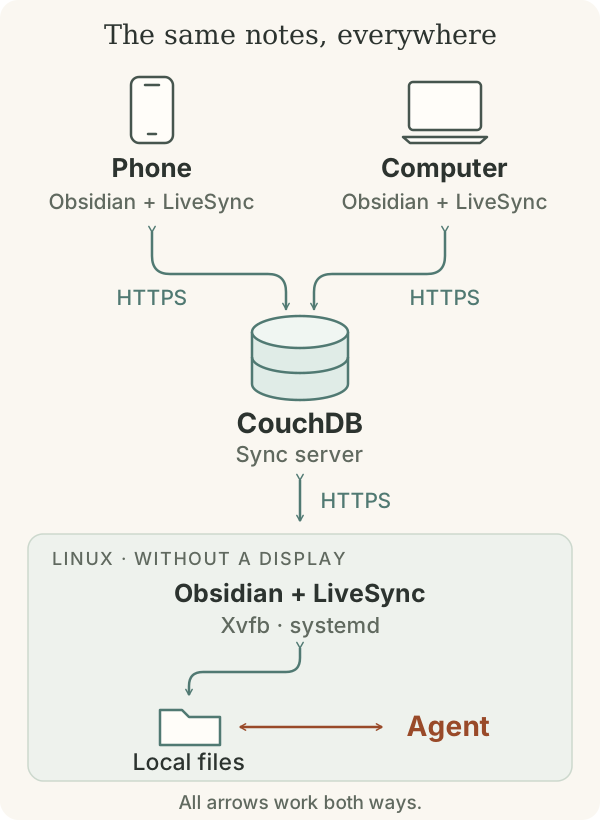
Each device has a local copy of the vault. LiveSync notices edits, sends them to CouchDB, and retrieves changes from other devices. The server stores the plugin’s internal representation of the data, rather than a folder of Markdown files.
The devices don’t have to be online together. The work computer can upload a change and go offline before the phone connects. Notes remain available without a network connection; synchronisation waits.
The agent works with local files on Linux. When it changes a note, the running Obsidian instance notices the edit and LiveSync carries it to the other devices. The agent needs no separate CouchDB integration.
In my setup, synchronised content is end-to-end encrypted. On each device, the files remain readable by Obsidian and the agent. If the agent uses a remote model, the data selected for the request goes to that model’s provider; sync encryption doesn’t change that boundary.
There is one unavoidable qualification on the phone. iOS can suspend Obsidian in the background, so the application sometimes catches up after I open it. The plugin runs inside Obsidian; it cannot turn it into a permanent background service. Seamless, for me, means that I don’t move files by hand or think about which operating system owns them.
The Linux Machine Needs an Obsidian Too
CouchDB alone doesn’t create a folder of notes on Linux. Something has to turn synchronised data back into files and pick up the agent’s edits. In my setup, that is the same Obsidian with LiveSync that runs on my work computer.
The server has no desktop, though. So Obsidian runs under Xvfb, a virtual display. The application still draws its window; nobody looks at it. Systemd starts it at boot and restarts it after a failure. Nobody has to keep a desktop session open.
This instance has a persistent profile: it opens the right vault and loads LiveSync on startup. A fresh profile would instead diligently display a welcome screen nobody can see. Community plugins are also enabled in the prepared profile. Without that setting, an installed LiveSync stays disabled: Obsidian runs, but synchronisation doesn’t.
The agent and Obsidian run as different users, but both can read and edit notes. A shared group and permissions for new files keep a note created by the agent accessible to Obsidian. The .obsidian settings directory is blocked from the agent: it contains plugin code and sync state it has no reason to edit.
Git Lives Next Door
Synchronisation also carries mistakes. A deleted paragraph can arrive on every device with perfect reliability.
That is why I keep a separate Git history on Linux. A phone edit first arrives through LiveSync and becomes a change to an ordinary file. Every five minutes, a separate process collects added, modified, and deleted files into a timestamped commit. If nothing changed, there is no commit. The same process records the agent’s edits; it doesn’t care who changed the file.
These are snapshots of the state that has reached Linux. A deletion made and undone between two runs may leave no trace in the history at all. But I can see what a project looked like that morning, or find a paragraph before the assistant decided to “improve” it.
Git’s internal data lives outside the vault. Git can keep its working files separate from the directory holding their history: the notes stay where they are, while commits, the index, and repository settings live next door. There is no .git inside the synchronised folder, so LiveSync cannot accidentally start shipping Git’s own internals between devices. Synchronising the notes and also the state of the program recording their history feels like an adventure I can do without.
Notes and attachments go into one Git repository; the Obsidian settings in .obsidian go into another, with narrower access. The agent can read note history, but not connection-settings history. Blocking the current directory would achieve little if its contents were available in an old commit.
The snapshot process has limited permissions too. It can read the vault and write history into the two external repositories, but the notes themselves are read-only to it. Its job is to remember what happened. It doesn’t need the ability to improve anything along the way.
The agent can use this history to compare versions and find lost text. A restored file is an ordinary new change as far as LiveSync is concerned, and travels to the other devices like any other edit.
Git works locally here; LiveSync still handles all exchange between devices. This history won’t survive losing the Linux machine without an independent backup.
With this in place, the more interesting part can begin: teaching the agent where things belong and what it is allowed to change. At least now, when I ask it to save something, I can open Obsidian on my phone and find the result.
Links
- Obsidian — the application for notes and a personal knowledge base.
- Markdown — the plain-text format used for notes.
- PARA — Tiago Forte’s explanation of his approach to organising information.
- Obsidian Bases — the core plugin for note views and collections.
- AGENTS.md — the format for a file of agent instructions.
- iCloud — the service I previously used to sync the vault.
- Obsidian Sync — the official sync service and its plans.
- Self-hosted LiveSync — the plugin behind my synchronisation.
- Apache CouchDB — the database through which devices exchange changes.
- Xvfb — the virtual display for Obsidian on the server.
- systemd — process management and scheduled services on Linux.
- Git — change history and access to earlier versions.