If you run PHP in containers, environment variables are probably part of your configuration story. With PHP CLI, reading them is boring in the best possible way:
<?php
echo getenv('APP_ENV');APP_ENV=production php read.php
#=> productionThen the same code moves behind PHP-FPM and suddenly returns nothing. The container has the variable. docker compose exec php env shows it. Your PHP process does not.
That gap is usually PHP-FPM’s clear_env directive.
What PHP-FPM Does
PHP-FPM pool configuration has a directive named clear_env. The PHP manual describes it as clearing the environment in FPM workers before adding variables explicitly defined in the pool configuration. Its default value is yes.
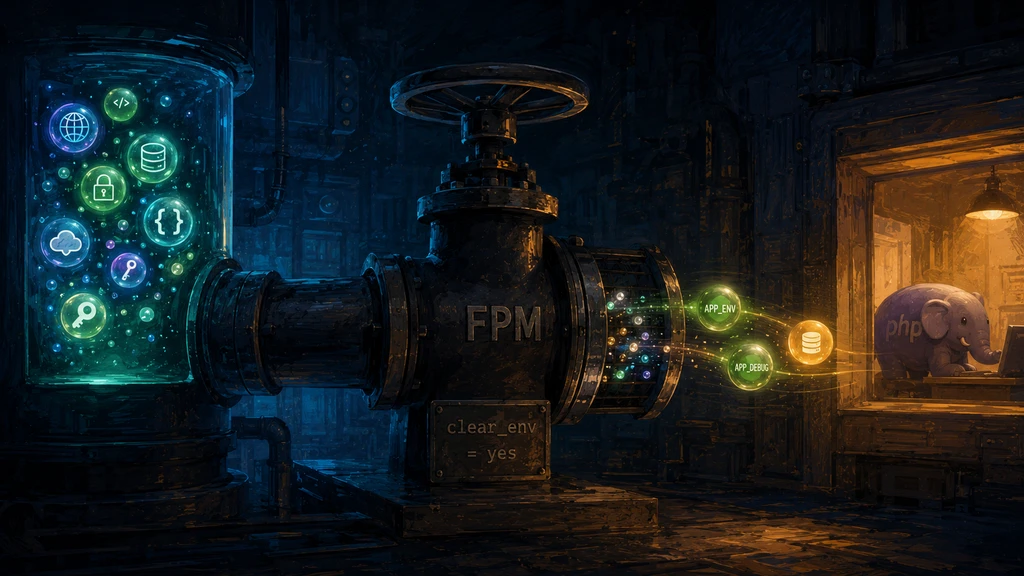
That default is sensible. A web worker should not inherit every variable from the service manager, shell, container runtime, or host. Environment variables often contain credentials, deployment metadata, proxy settings, and values that were never meant to be visible to application code.
The result is simple:
- the container can have
APP_ENV=production; - the FPM master process can start with that variable;
- the worker that handles your HTTP request still will not expose it to
getenv()unless you allow it.
Prefer a Whitelist
The safest fix is to pass only the variables your application needs.
In the PHP-FPM pool config:
; www.conf
env[APP_ENV] = $APP_ENV
env[DATABASE_URL] = $DATABASE_URL
Then your application can read:
<?php
echo getenv('APP_ENV') ?: 'not set';
The path to the pool file depends on the image or distribution:
- official PHP Docker images commonly use
/usr/local/etc/php-fpm.d/www.conf; - Debian and Ubuntu packages commonly use
/etc/php/<version>/fpm/pool.d/www.conf; - custom images may copy pool files from the project repository.
After changing the pool config, reload or restart PHP-FPM. If the application runs in Docker, rebuild the image if the pool file is baked into it, or restart the service if it is mounted as configuration.
When clear_env = no Is Acceptable
You can disable the cleanup:
; www.conf
clear_env = no
That makes FPM workers inherit the process environment more broadly. It is convenient in small, single-purpose containers, especially when the container is dedicated to one application and the environment is already curated by Compose, Kubernetes, or another orchestrator.
It is still a trade-off. Use it only when you are comfortable with everything in the process environment being available to PHP code. Be especially careful if the app can call phpinfo(), dump diagnostics, run untrusted code, or expose exception pages.
For shared servers, mixed workloads, or anything with unclear process boundaries, keep clear_env = yes and whitelist variables with env[...].
Docker Is Only Half of the Story
Docker Compose can set environment variables for a container with environment or env_file, and docker run can set them with -e. That only proves the variable exists in the container process environment.
PHP-FPM still decides what reaches workers.
A good debugging sequence:
## 1. Is the variable in the container?
docker compose exec php env | grep APP_ENV

## 2. Is the variable listed in the FPM pool config?
docker compose exec php grep -R 'env\\[APP_ENV\\]' /usr/local/etc/php-fpm.d /etc/php 2>/dev/null

## 3. Does PHP see it through the same execution path as the web request?
curl https://example.test/debug-env
The third check matters. php -r 'var_dump(getenv("APP_ENV"));' tests CLI, not FPM.
Practical Rule
For application mode flags and non-sensitive configuration, whitelist the variables explicitly:
env[APP_ENV] = $APP_ENV
env[APP_DEBUG] = $APP_DEBUG
For secrets, prefer your platform’s secret mechanism when possible. Docker’s own documentation warns against passing sensitive values as plain environment variables in Compose and recommends secrets for that use case.
Environment variables are configuration plumbing. PHP-FPM adds one valve in the middle. Keep it closed by default, then open only the names your application actually needs.